
Review workflow
Every build lands in reviewing once diffing finishes (default-branch builds auto-approve). Review is per story and mode: when a project captures several browsers, one decision covers every browser (see below). The build gate is the merge gate.
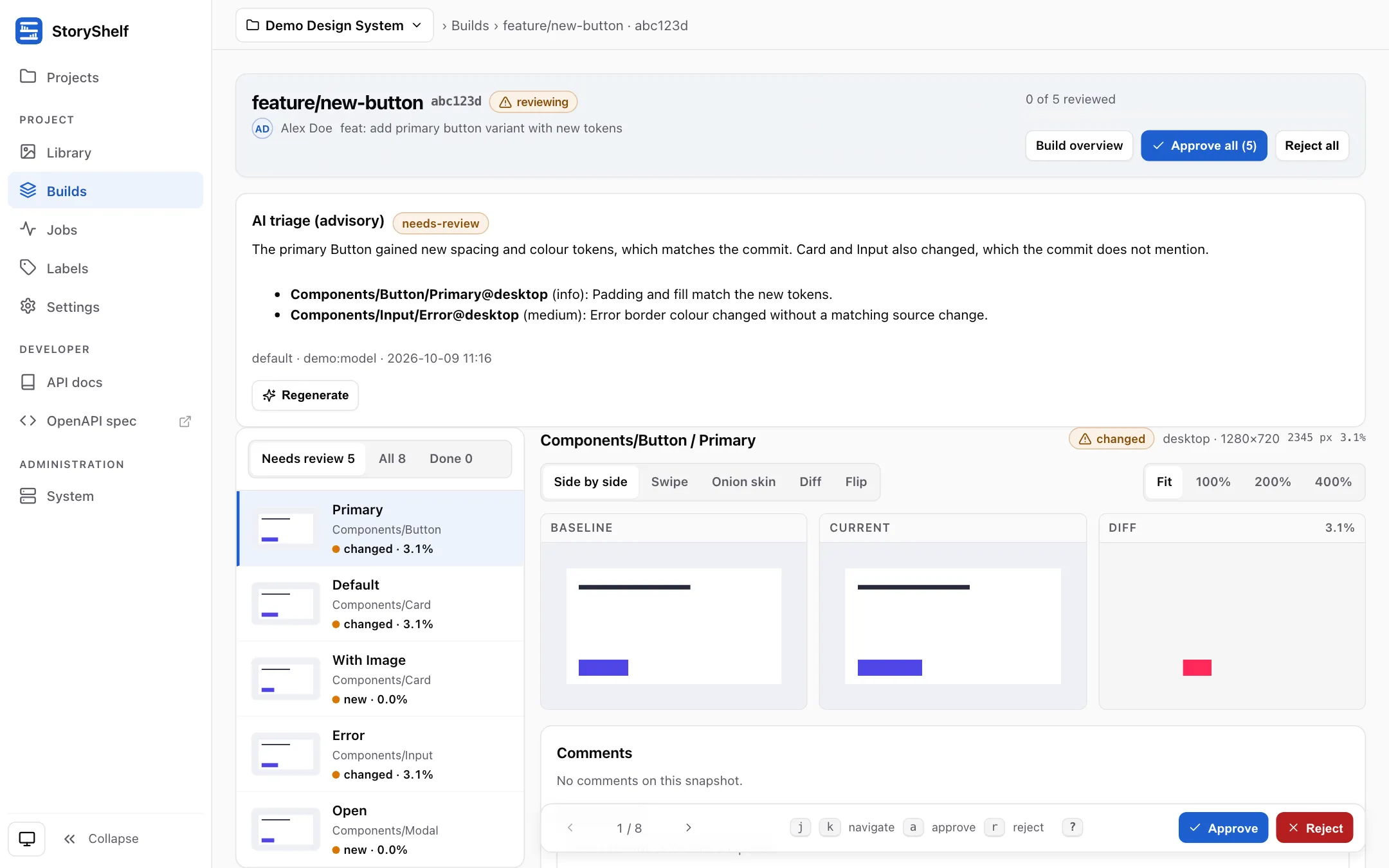
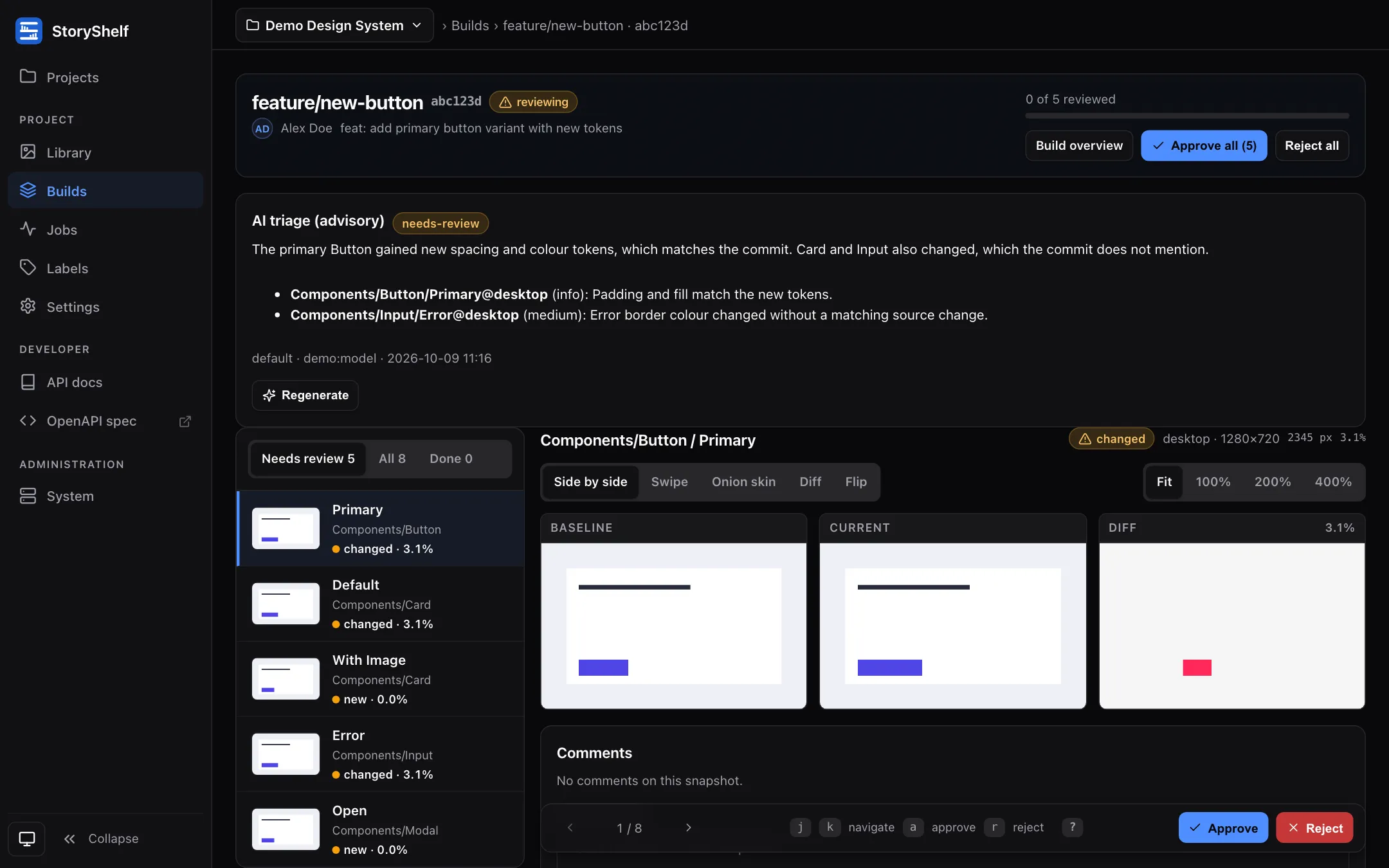
The review page is a workspace:
- Filmstrip (left): a thumbnail per snapshot with its status and diff size, filterable to Needs review, All, Done or, when axe found something, A11y. The header shows how many changes you have reviewed.
- Comparison (centre): Side by side, Swipe (drag the round handle on the divider, or use the slider beneath), Onion skin (blend baseline and current), Diff (the overlay alone) and Flip (toggle between baseline and current), with Fit / 100% / 200% / 400% zoom — zoomed-in images are drawn as crisp pixels so you can inspect individual changed pixels. Panes scroll together, and your mode and zoom are remembered.
- Action bar (pinned at the bottom): previous/next, Approve and Reject. Deciding a snapshot moves you straight to the next one that still needs review.
Keyboard: j/k (or →/←) move between snapshots, a approves, r rejects, 1–5 pick a comparison mode, f cycles zoom, +/- zoom in and out, t flips baseline/current, and ? lists them all. Approve all and Reject all in the header ask for confirmation first.
Approve / reject
Section titled “Approve / reject”- Story and mode, all browsers:
POST /api/v1/projects/:slug/builds/:id/stories/:storyId/modes/:modeKey/approve(or/reject). Every open snapshot of that story/mode is approved and each engine’s baseline promoted. If any engine’s baseline changed after its diff, nothing is approved (409) unless?force=true. In the review page the primary Approve does this; Only this browser (for example “Only firefox”) approves just the browser you are viewing, and[/]switch browser. - One snapshot:
POST /api/v1/projects/:slug/builds/:id/snapshots/:snapshotId/approve(or/reject). Approving copies that snapshot’s PNG tobaselines/{branch}/{storyId}/{viewport}.png— the branch’s new expected. - Bulk:
POST …/builds/:id/approve-all/reject-all. A story/mode whose baseline drifted on any engine is skipped as a whole.
The build status flips to approved when every new/changed snapshot is resolved, rejected if any is rejected, stays reviewing while unresolved. Snapshot statuses: new (no baseline), changed (threshold exceeded), unchanged (within), approved/rejected/pending.
Comments
Section titled “Comments”Threaded review comments live on a build, a story of the build’s catalog or a single snapshot, with resolve. A comment has exactly one anchor:
GET /api/v1/projects/:slug/builds/:id/commentsPOST …/comments { body, snapshotId? | storyId?, parentId? }(snapshotIdandstoryIdtogether are refused with 400)POST …/comments/:commentId/resolve
developer, approver and admin write; viewer reads. Build and story comments show on the build page and story comments also on the story’s component page; the snapshot review page shows the thread of the selected snapshot together with the build comments and the comments on that snapshot’s story. The forms in the UI post to the same handlers through page routes under /projects/:slug/builds/:id/…, since a browser form cannot send JSON.
Comments persist until the build is purged (see Retention). The UI’s diff overlay (baseline | current | diff) is the heat map: red = changed pixels, thresholds from pixel_threshold / max_diff_ratio or per-story diffThreshold.
A project can turn comments and verdicts off with its review switch; they are then hidden, not deleted.
Review without screenshots
Section titled “Review without screenshots”Review is the place where people comment on a build and sign it off. It works whether or not a project captures screenshots: a hosting-only instance reviews a published Storybook at the build level, and a project with testing adds the same comments, changeset and sign-off beside its visual diffs.
The review switch
Section titled “The review switch”Review is a per-project switch (reviewEnabled, on by default) edited by project admins in Settings → General → Review or with PATCH /api/v1/projects/:slug; see Project settings. With review on, a project has these four combinations:
testing | review | A build |
|---|---|---|
| off | off | Accepted when publishing finishes. No comments, no verdicts, no review status. |
| off | on | Default branch: accepted when publishing finishes. Other branches: pending until verdicts decide it, <prefix>/review status. |
| on | off | Snapshot approval alone decides; comments and verdict routes answer 404. |
| on | on | Snapshot approval decides, plus comments, the changeset and a build-level sign-off that does not gate. |
The default branch is never held, so the project’s Storybook link always resolves. A pending build is not the project’s latest accepted build: the Storybook link keeps serving the previous accepted build until this one is approved, while the build’s own page and its published Storybook (/projects/:slug/storybook/build/:id/, or the /_/:id short link) open for anyone who may view the project, whatever the build’s status.
With review off every review route answers 404 for that project, evaluated on every request (the same routes are marked x-storyshelf-class: review in the OpenAPI document). Someone who may not view the project gets the route’s usual refusal, so the 404 reveals nothing about a project they cannot see.
Reviewers
Section titled “Reviewers”The approver and admin roles are the reviewers; there is no separate reviewer role, no per-build assignment and no “request review from” step. Every approver and admin of the project reviews every build that waits.
- Being asked. When a published build waits for a verdict, a
review:requestedevent goes to the project’s approvers and admins. Unlike other notification topics, which are opt-in, this one is on by default for those roles: a reviewer with no subscription receives it by email (when an email transport is wired), and turns it off by saving their notification preferences for the project with Email me unticked, or with a topic list that leaves it out. Channels and webhooks receive it like any other event. - Commenting.
developerand above comment;viewerreads only. Unresolved comments never block a verdict. - A new build needs a new approval. Verdicts belong to the build, as snapshot approvals do. The build under review is the latest on its branch; earlier pending builds fall away under retention.
The build page
Section titled “The build page”A build’s page is the review workspace for a project without testing, and with testing the changeset sits above the visual diffs and the verdict and comments below them:
- Review card. While the build’s Storybook is still publishing, the card shows “Waiting for the Storybook to publish” instead of the verdict buttons (the server refuses a verdict until then). The build’s standing (
waiting for review,approved,rejected), the approvals so far against the requirement, each reviewer’s latest verdict with their note, and, for approvers and admins, Approve build and Reject build with an optional note. Withtestingthe card says the verdict is a sign-off only. - Changes in this build. The components the build added, removed or changed against its baseline, each with a link to the published story and to its component page (see the changeset).
- Comments. Build comments and story comments with their anchor, resolve actions, and a form to add a build comment (
developerand above).
Accessibility results
Section titled “Accessibility results”With testing on and the project’s accessibility checks on (runA11y, the default), the axe findings of each capture are stored on its snapshot (a11yViolations, a JSON array of one line per violation: rule id, impact, help, a short selector, node count). The snapshot review page lists them in a warning note above the comparison, the filmstrip entry shows a11y N with the browser it was found on, and the component page lists them on each snapshot card. axe runs on the project’s primary browser target only (the first one in its list), so the findings carry that browser’s name wherever they are shown, and the other browsers of the same story show the same note. They are information for the reviewer: a violation never changes a snapshot’s or a build’s status and never blocks a merge. If axe could not run on a capture (the page crashed, the script could not load), the snapshot stores axe unavailable: <reason>. That is not a finding: it is left out of every count and shown instead as a neutral note, axe did not run, with the reason on the snapshot, and the build page and review header say how many snapshots it affects. The build page shows the total as Accessibility findings (and the review page header as a11y N), and the filmstrip filter A11y lists the snapshots that carry findings. See the runners for what is scanned.
Verdicts
Section titled “Verdicts”Approvers and admins give a build a verdict, approved or rejected, with an optional note:
POST /api/v1/projects/:slug/builds/:id/reviews { verdict, body? }GET /api/v1/projects/:slug/builds/:id/reviews(any viewer): each reviewer’s latest verdict, the approvals against the requirement, and the full history.
A reviewer’s newest verdict counts, so rewriting one is another POST. With testing off the build is approved once the project’s required approvals (reviewApprovals, default 1) are present among the reviewers’ latest verdicts and none of those is rejected; it is rejected when any is, and pending otherwise (for example when a rejecting reviewer rewrites to an approval and too few approvals remain). Each reviewer counts once. A failed build answers 409, and so does a build whose publishing has not ended: a verdict is accepted once the build’s Storybook is published (the build page and the API say “still publishing” until then), and a build whose publish failed is failed and not reviewable.
Who gave the verdict. A verdict is attributed to a user. In the UI that is the signed-in user; with the API it is the user who owns the token, so a CI token created by a reviewer approves as that reviewer. A caller that is no user, such as the bootstrap admin token or a token without an owner, gets 403 when authentication is on. Only an instance with no authentication configured at all records a verdict without a user, as one anonymous reviewer; that only works while the project requires one approval (reviewApprovals of 1). With a higher requirement the anonymous verdict is refused with 409, because one anonymous reviewer could never supply a second approval: enable authentication to review such a project.
A build that failed or that a user cancelled (status cancelled, Builds) has nothing to review: a verdict and a snapshot approval on it answer 409, and the build page shows no verdict card. A verdict that approves or rejects the build, or that sends it back to pending (a rejecting reviewer rewrites to an approval and too few approvals remain), fires the matching build:approved / build:rejected / build:pending webhook and notifications, and every verdict fires review:verdict. Accepting a build automatically (default branch, or any branch with review off) fires no approval event.
The changeset
Section titled “The changeset”Without screenshots the build page says what changed from the Storybook catalog: for each component (a story file) the build’s build_components hash is compared with the baseline build, the latest accepted build of the same branch before it, falling back to the latest accepted build of the default branch. The list shows components added, removed and changed (a changed hash means the component’s stories differ: stories added, removed or renamed), the count of unchanged ones, and links to the published story and the component page. GET /api/v1/projects/:slug/builds/:id/changeset returns the same data as JSON.
This is a coarser signal than pixels and is shown as such: a changed hash means the definition changed, not that the story looks different. The index a Storybook publishes carries no story arguments or source, so a story whose arguments change but whose id, name and title do not is not listed. A first build with nothing accepted before it lists every component as added.
Story comments
Section titled “Story comments”On a component page, the Stories tab shows the comments of the build the page shows under the previewed story, with a form for developer and above. A story comment stays attached to its story if the build is later captured, and the snapshot review page shows the comments of its story. A comment on a story that a later build renames or removes stays with the build it was written on.
Statuses
Section titled “Statuses”The build’s git channels show <prefix>/review (pending, then success or failure from the verdict) when testing is off and review is on. While the build waits for several approvals the description shows the progress (Waiting for approvals: 1 of 2). When review is turned off, accepted builds show a final success (Review is off), so a pull request is not left with a pending review status. These statuses sit next to the informational <prefix>/storybook that links the published Storybook. With testing on, <prefix>/testing stays the only gating status; review never adds a second required check. See Merge gate setup.
Events
Section titled “Events”Review raises three webhook and notification topics:
| Event | When |
|---|---|
review:requested | A published build waits for a verdict (review on, testing off). On by default for approvers and admins. |
review:comment | A build or story comment is posted. Snapshot comments keep comment:created. |
review:verdict | A reviewer approves or rejects a build. |
Builds nobody finishes
Section titled “Builds nobody finishes”A pending build waits for a verdict, so it needs an exit. The retention purge removes a pending build once its last activity (the upload, or its newest comment or verdict) is older than the retention window (purgeTtlDays), including builds a newer build on the same branch replaced. Turning review off accepts, in one pass when the setting is saved, the project’s pending builds that no capture worked on, so a project that switches review off does not keep a queue nobody will clear.
For agents
Section titled “For agents”The MCP server can read and write comments, including storyId comments, but has no tool to give a verdict: an agent cannot sign off a build.
Retry & merge gate
Section titled “Retry & merge gate”- Flaky capture: Retry on the build page re-enqueues the same build ID (
POST …/builds/:id/retry) — see Interaction testing forflakyTesthandling. - Merge gate: each project posts a
<prefix>/testingcommit status (prefixstoryshelfby default) through its git channels (@storyshelf/notify-git). Branch protection marks it required —pendingwhile capturing and while review is open,successwhenapproved,failurewhenrejectedor capture failed. The status follows the build’s current state and is delivered durably with retries (see Delivery). A future GitHub App will add per-snapshot check-run annotations (ADR 0010).
AI triage and project health
Section titled “AI triage and project health”When a site admin has enabled AI for the project, the review page shows an advisory AI triage panel (verdict, summary and per-snapshot notes). Approvers and admins can generate or regenerate it. The project Library and Builds pages show an AI project health panel, and the project card shows its verdict. None of this approves or rejects anything: it only helps you decide. See AI insights.
Component pages
Section titled “Component pages”Every story file has a stable page at /projects/<slug>/components/<path>. Its Stories tab previews the published story with the story’s review comments, and lists the file’s stories and docs, and its History tab lists the builds that hold it; with testing it also has States, Figma design and Linked packages. See Published Storybook. The library, review page and build cards link to it. If a file is renamed or removed, the old URL explains where it moved or which build last had it.
Related
Section titled “Related”- Builds & snapshots — statuses & attempts
- Baselines & branches — which baseline is expected
- CI setup — required status check
- API reference — endpoint walkthrough